All Stories
Showing posts with label Tips. Show all posts

Thursday, 1 May 2014

Some Disadvantages of enabling Google+ comments on Blogger‏


The Google Plus comments integrationwith Blogger is turning quite some heads now, and a lot of bloggers have gone ahead and implemented it. This seems to be one of the biggest improvements in Blogger over the recent past. And at first glance, it looks pretty slick, with a clean and solid implementation. It makes things really easy, especially for bloggers who can track the conversation more easily. At the same time, readers can contribute right from Google Plus, without needing to open the blog. However, upon closer inspection, it seems that the new implementation isn't without its flaws.


It has been some days since this feature came out - plenty of time for us to play with it. And there do seem to be some disadvantages of using this new commenting system. These might manifest themselves later on, if not immediately.

Disadvantages of using Google+ comments on blogger

Firstly, to use this feature, users need to use their Google account ID, which can be a bit of a problem for readers who are using alternatives.

But the real problem lies in the fact that this commenting system is dependent upon the URL of your blog. If you change the URL, for example when you are migrating to another domain or re-branding, you will not be able to migrate these comments, and they will be deleted! Unlike Facebook Comment API, Google comments aren't stored on any app accounts. This means that migration is not an option, and that, you'll lost all your comments should any such thing happen.

Another big disadvantage is the increase in Page Load Speed. It takes some time before all the data is fetched from Google. Usually, this isn't noticeable, but try loading your blog on a slow dial-up connection, and you will see those comments appear much later.

Some people have also reported that the comment statistics are no longer accurate (or sometimes visible).

All in all, it's a pretty good package, but Google really needs to spend some more time with it. If you have problems, or have suggestions, please feel free to comment in the section below. Cheers :)

Posted at Thursday, May 01, 2014 |  by Unknown

Saturday, 25 January 2014

Blogger Tips

Submit URL of your blogsite to Google, Bing, Yahoo! and Ask

When you make a blog on any platform like wordpress then you really want to add your blog on major search engines like Google, Bing, Yahoo, Ask and so on, But you don't no that how. If you make a blog on blogger now blogger automatically adds your blog in Google search directory but not add in other major search engines and in word press and other platform you have to add your blog in every Search engine manually, So in this post i will teach you about submission of your desire URL to the Major Search engines directory for free, thus you have to follow these steps which i am going to tell you below; Once you submit your URL, it could take several days or weeks for the search engines to index your site's...

Replace Next, Home and Previous links with Beautiful Shiny Buttons in Blogger

Beautiful buttons make your blog attractive and stylish. In most templates they have next, Previous and Home link only not have beautiful buttons. But in this post i will give you best and beautiful way to make your blog's Next, Home, and Previous links with beautiful buttons. How Replace Next, Home and Previous links with Beautiful Shiny Buttons in Blogger, see the easy and simple way to add these  Beautiful Shiny Buttons in Blogger. For adding these beautiful Shiny Buttons to blog then you have to follow these simple steps. How to Replace Next, Home and Previous links in Blogger 1. Go to Blogger Dashboard> Template> Edit HTML 2. Make a backup of your blog 3. Search for...

Portect Your Blog Posts For Bring Copied !!!

In this new age every person want to become a rich man, in the internet world most of the people copy others blog's content to his/her blog. This is not right to steal other content, because you spend your lot of time for writing articles and when someone copy your that content then you definitely become agar on that person. Google is a Major Search Engine of the world, Google is also against this and if someone steal your content then you told him/her that do not copy the content if he/she does not follow you then you finally told this to Google and Google will definitely remove his/her site from search engine and when someone's blog remove we really disprove because he/she also want to earn money therefore...

How To Backup/Download and Restore Templates

Every blogger should must Backup/Download their template before to do some changes in their template. Because sometimes we want to make changes in our blogger template but we forget to Backup our template, but if unfortunately those changes make some problem in our blog and if we do not know about that problem then that problem become a very difficult to us for solving. Therefore we should always Backup / Download our template before making some changes in template, because if we make a Backup / Download our template then if something will wrong in our template then we can restore our template by easily to bring your template to its undo/real form. So today for solving this problem, i will teach you about that how...

How To Create and Start Blogger.

Blogger is a blog publishing service that allows you private or multi-user blogs with time-stamped entries. It was developed by Pyra Labs, which was bought by Google in 2003. Generally, the blogs are hosted by Google at a subdomain of blogspot.com. Now a days everyone want to earn money including those who used internet, because earn money from internet online is best method for earning without any physical working. Some of the people want to earn money without any effort but it is not possible for earning money. So in Internet Globe world, if you want to earn money then you have to work hard to earn money, in the internet you can earn money with a lot of ways but in this Guide I will told you a best handsome and generous method for...

Posted at Saturday, January 25, 2014 |  by Unknown

Submit URL of your blogsite to Google, Bing, Yahoo! and Ask

When you make a blog on any platform like wordpress then you really want to add your blog on major search engines like Google, Bing, Yahoo, Ask and so on, But you don't no that how. If you make a blog on blogger now blogger automatically adds your blog in Google search directory but not add in other major search engines and in word press and other platform you have to add your blog in every Search engine manually, So in this post i will teach you about submission of your desire URL to the Major Search engines directory for free, thus you have to follow these steps which i am going to tell you below;

Once you submit your URL, it could take several days or weeks for the search engines to index your site's pages.


Submit your URL to Google


2. Type your blog/site URL, that you want to add
3. Enter Captcha text shown in box
4. Sekect Add URL

See the example in image

Submit your URL to Bing


1. Go to the following link http://www.bing.com/docs/submit.aspx
2. Type your blog/site URL, that you want to add
3. Enter Captcha text shown in box
4. Sekect Add URL
See the example in image

Submit your URL to Yahoo!


1. Go to the following link http://search.yahoo.com/info/submit.html
2. Click on "Submit your site for free"
3. You will be redirected to Bing, Follow the on-screen instructions for submitting your URL.

Submit your URL to Ask


Ask does not have an URL submit feature. Until recently, you could submit your sitemap to them. But ask.com has been now retired this feature. So, the next best thing is to add a directive in your robots.txt file that specify auto-discovery of the XML sitemap.

Example like that

      Sitemap: http://www.the URLof your sitemap here.xml

 If you will do all the above steps completely it just take some time to index pages, so just be patience and wait for indexing.

Posted at Saturday, January 25, 2014 |  by Unknown

Replace Next, Home and Previous links with Beautiful Shiny Buttons in Blogger

Beautiful buttons make your blog attractive and stylish. In most templates they have next, Previous and Home link only not have beautiful buttons. But in this post i will give you best and beautiful way to make your blog's Next, Home, and Previous links with beautiful buttons. How Replace Next, Home and Previous links with Beautiful Shiny Buttons in Blogger, see the easy and simple way to add these 
Beautiful Shiny Buttons in Blogger. For adding these beautiful Shiny Buttons to blog then you have to follow these simple steps.


How to Replace Next, Home and Previous links in Blogger


1. Go to Blogger Dashboard> Template> Edit HTML
2. Make a backup of your blog
3. Search for this code    (Tip: CTRL+ F)
<data:newerPageTitle/>
Now replace the above code with the below code
<img src="URL-OF-PREVIOUS-BUTTON"/> 

4. After this Search for this code
<data:olderPageTitle/> 
Now replace the above code with the below code
<img src="URL-OF-NEXT-BUTTON"/>

5. Then Search for that code
<data:homeMsg/>
Note: The above code appears twice in template and you have to replace the both codes with the below code
<img src="URL-OF-HOME-BUTTON"/> 

i) Replace URL-OF-PREVIOUS-BUTTON with your Previous image URL
ii) Replace URL-OF-NEXT-BUTTON with your Next image URL
iii) Replace URL-OF-HOME-BUTTON with your Home image URL

Save your template and Finally you are done.

Posted at Saturday, January 25, 2014 |  by Unknown

Portect Your Blog Posts For Bring Copied !!!

In this new age every person want to become a rich man, in the internet world most of the people copy others blog's content to his/her blog. This is not right to steal other content, because you spend your lot of time for writing articles and when someone copy your that content then you definitely become agar on that person. Google is a Major Search Engine of the world, Google is also against this and if someone steal your content then you told him/her that do not copy the content if he/she does not follow you then you finally told this to Google and Google will definitely remove his/her site from search engine and when someone's blog remove we really disprove because he/she also want to earn money therefore i give a best way to protect your blog from being copied without any worry, Just follow my instructions;


How to protect Your Blog's Content


1. Go to Blogger Dashboard> Layout> Add a Gadget
2. Select "HTML/ JavaScript"
3. Now Copy the below code and paste it in that HTML/ JavaScript Box

<script type="text/javascript">
 var omitformtags=["input", "textarea", "select"]
 omitformtags=omitformtags.join("|")
 function disableselect(e){
 if (omitformtags.indexOf(e.target.tagName.toLowerCase())==-1)
 return false
 }
 function reEnable(){
 return true
 }
 if (typeof document.onselectstart!="undefined")
 document.onselectstart=new Function ("return false")
 else{
 document.onmousedown=disableselect
 document.onmouseup=reEnable
 }
 </script>

 After pasting the above set of code save it. You are done. Now your blog is become as an anti Copying blog.

Posted at Saturday, January 25, 2014 |  by Unknown

How To Backup/Download and Restore Templates

Backup Template
Every blogger should must Backup/Download their template before to do some changes in their template. Because sometimes we want to make changes in our blogger template but we forget to Backup our template, but if unfortunately those changes make some problem in our blog and if we do not know about that problem then that problem become a very difficult to us for solving. Therefore we should always Backup / Download our template before making some changes in template, because if we make a Backup / Download our template then if something will wrong in our template then we can restore our template by easily to bring your template to its undo/real form. So today for solving this problem, i will teach you about that how to make a Backup / Download your blogger template and restore your blogger template.


Now lets begin to know about this a great helpful trick,

How to Backup/Download your Blogger Template


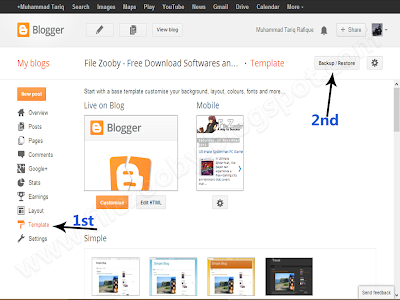
1.  Go to Blogger Dashboard >> Template >> Backup / Restore

Backup Template_2
2. Now click on "Download full template"

Backup Template_3

How to Restore your Blogger Template


1.  Go to Blogger Dashboard >> Template >> Backup / Restore

Backup Template_4
2. Now click on "Choose File" button and open your template that you want to restore.

Backup Template_5

3. After this press "Upload" button.


Backup Template_6
 Now you are done. If you like our tutorials then kindly like and subscribe us.

Posted at Saturday, January 25, 2014 |  by Unknown

How To Create and Start Blogger.

Blogger is a blog publishing service that allows you private or multi-user blogs with time-stamped entries. It was developed by Pyra Labs, which was bought by Google in 2003. Generally, the blogs are hosted by Google at a subdomain of blogspot.com. Now a days everyone want to earn money including those who used internet, because earn money from internet online is best method for earning without any physical working. Some of the people want to earn money without any effort but it is not possible for earning money.
So in Internet Globe world, if you want to earn money then you have to work hard to earn money, in the internet you can earn money with a lot of ways but in this Guide I will told you a best handsome and generous method for earning. Thus you have to create a blog and post there some unique posts that not already published in another website. If you really want to create a blog and earn money from it then you have to create a blog with unique contents. So let’s for creating a blog on blogger platform, follow this easy Guide,


How to Create a Blog on Blogger Hosting Platform?


1. Go to Blogger.com and enter your Gmail ID if you have not Gmail Account then click here to create

See Also:
Recommended Article: How to create a Gmail Account ID

2. After that press “New Blog” button for creating a new blog

Step 1

3. In title bar you have to write your blog’s Title whatever you want
4. And in Address bar you have to write your blog’s Address and select any template

Step 2

Step 3

Posted at Saturday, January 25, 2014 |  by Unknown

Ad

Receive all updates via Facebook. Just Click the Like Button Below

?

Dapatkan Widget Ini Di Muhammad Yousaf | Simple SEO Tips @ Blogger Tips

Blogger template. Proudly Powered by Blogger.
back to top